 publish
Receipt images become useful to a bookkeeper when their amounts can be reviewed in rows. This walkthrough uses Tesseract locally to produce that CSV, then holds an incomplete row until a recorded correction supplies the missing total.
You will scan two generated sample receipts, inspect a review image and finish with two approved CSV rows totaling 110.97. The complete Python program and the observed outputs are included below. No cloud OCR account or accounting connection is required.
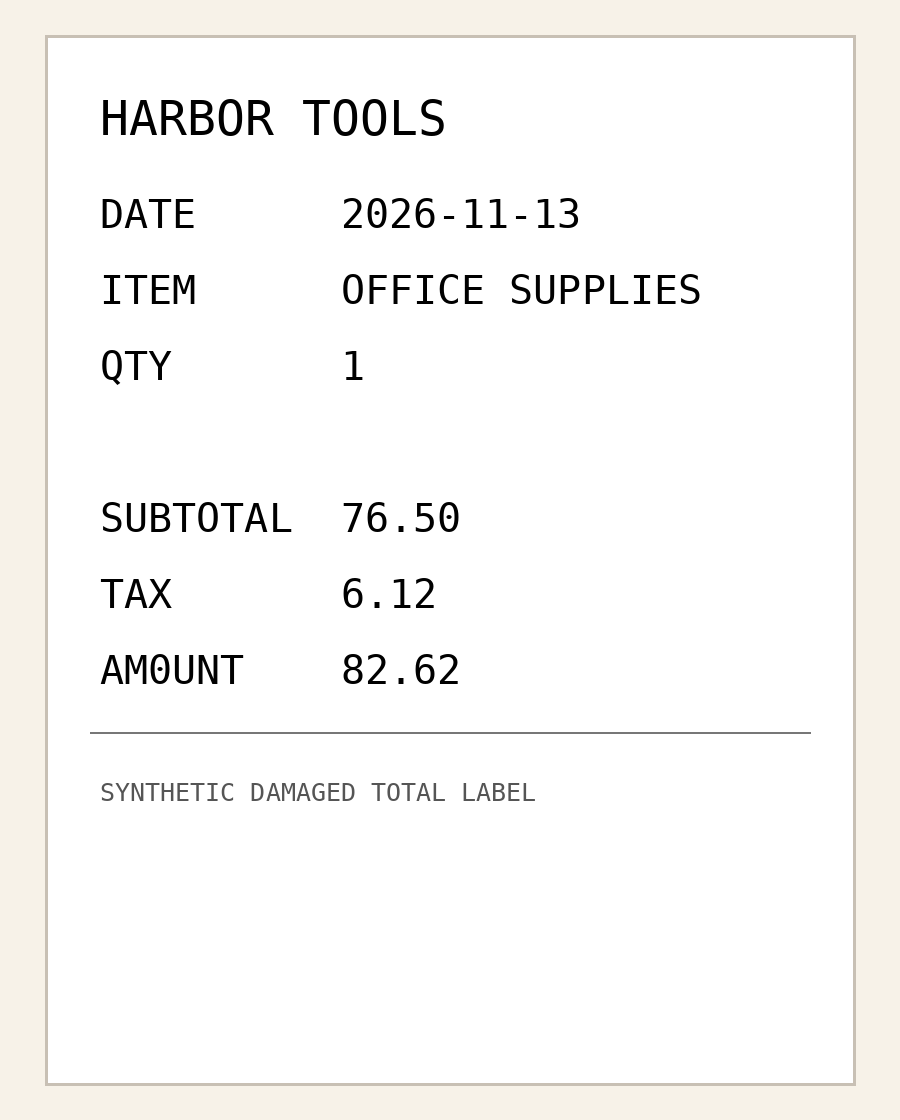
The failure is deliberately small and specific. One sample receipt has the label AM0UNT beside its total. Tesseract reads that altered label, but the program only recognizes a line beginning with TOTAL. The missing field is a parser failure in the sample, not evidence that Tesseract misread the amount or that the workflow has been tested on real business receipts.
The finished approved CSV contains the source-image hash, parsed fields, arithmetic result and review state. It is an import candidate, not proof that an expense is legitimate, tax deductible or assigned to the right account.
When a spreadsheet is the better tool
If you handle a handful of receipts each month, enter them directly into your existing spreadsheet or accounting product. A manual route has less setup, and a person can judge business purpose, category, currency and duplicate risk while typing the amount.
This local OCR route is worth evaluating when repeated batches make transcription tedious, images should not leave the computer, or you need a CSV boundary that a bookkeeper can inspect. It is not a substitute for recordkeeping advice, receipt retention rules or the controls in your accounting product.
What the local pipeline does
Tesseract turns the pixels into words and word-level confidence values. The Python program groups those words into lines, then looks for a strict date and money-field pattern. Strict parsing is deliberate. If a line does not begin with TOTAL, the program leaves total blank instead of using the largest number on the image.
That choice prevents an attractive but unsafe shortcut. Receipts can contain cash tendered, change, discounts, card fragments and loyalty balances. “Largest number wins” can silently select the wrong field.
The parser then checks whether subtotal + tax = total. A missing value becomes NOT_CHECKED; a numeric disagreement becomes FAIL. Either condition creates a REVIEW row. A separate correction CSV names the receipt, field, corrected value, reason and reviewer. Only after the correction is applied and the arithmetic passes does the program create approved_receipts.csv.
The first sample uses an ordinary TOTAL line. The second uses the visibly damaged label AM0UNT beside 82.62. This is a synthetic failure fixture, not a claim about Tesseract's general accuracy.
Prerequisites, permissions and cost boundary
The recorded run used:
- Tesseract 5.5.0 with English language data
- Leptonica 1.84.1
- Python 3.12.14
- Pillow 13.0.0
- DejaVu Sans Mono for the generated sample images
You need permission to read the receipt images and write a local work folder. The exercise uses no customer data, cloud OCR, paid model account or accounting credentials. Incremental provider cost for the recorded run was $0. Local compute, installation, review, repair and future maintenance still have costs.
The execution produced one held row and one correction. Human review time was not measured because the correction file was prepared as part of the synthetic fixture. Setup time, real-batch error rate and ongoing maintenance are also unknown. Do not turn this two-receipt run into a savings estimate.
Tesseract's official release notes list 5.5.0 on November 10, 2024 and later 5.5.x releases. The article records the installed version that was actually executed. Test again before changing Tesseract, language data or page-segmentation mode.
1. Create a clean folder
Install Tesseract using your operating system's package manager. Confirm the binary and Python versions:
tesseract --version
python3 --version
python3 -m pip install Pillow==13.0.0
Create an empty folder and save the complete tested program as receipt_review.py. The full source is also printed in the optional technical appendix at the end of this lesson.
The program refuses to reuse a nonempty input folder, overwrite an existing work folder or replace an approved export. Those stops preserve the failed run and the review record.
2. Generate the sanitized sample inputs
Run:
python3 receipt_review.py make-samples inputs
Complete observed stdout was:
SAMPLES receipts=2 synthetic=true damaged_labels=1
FILES receipt-001.png receipt-002.png corrections.csv
The command returned status 0 with empty stderr. The two PNG files are generated, not customer receipts. corrections.csv contains one reproducible repair:
receipt_id,field,corrected_value,reason,reviewer
receipt-002,total,82.62,Read visible amount beside damaged total label,sample-reviewer
In real work, the reviewer must create that row after examining the original image and supporting context. A prefilled correction is acceptable for a deterministic lesson, not for live bookkeeping.
3. Run OCR and preserve the failed row
Run the scan into a new directory:
python3 receipt_review.py scan inputs work
Complete observed stdout was:
OCR tesseract=5.5.0 language=eng psm=6
INPUT receipts=2 synthetic=true
RESULT ready=1 review=1
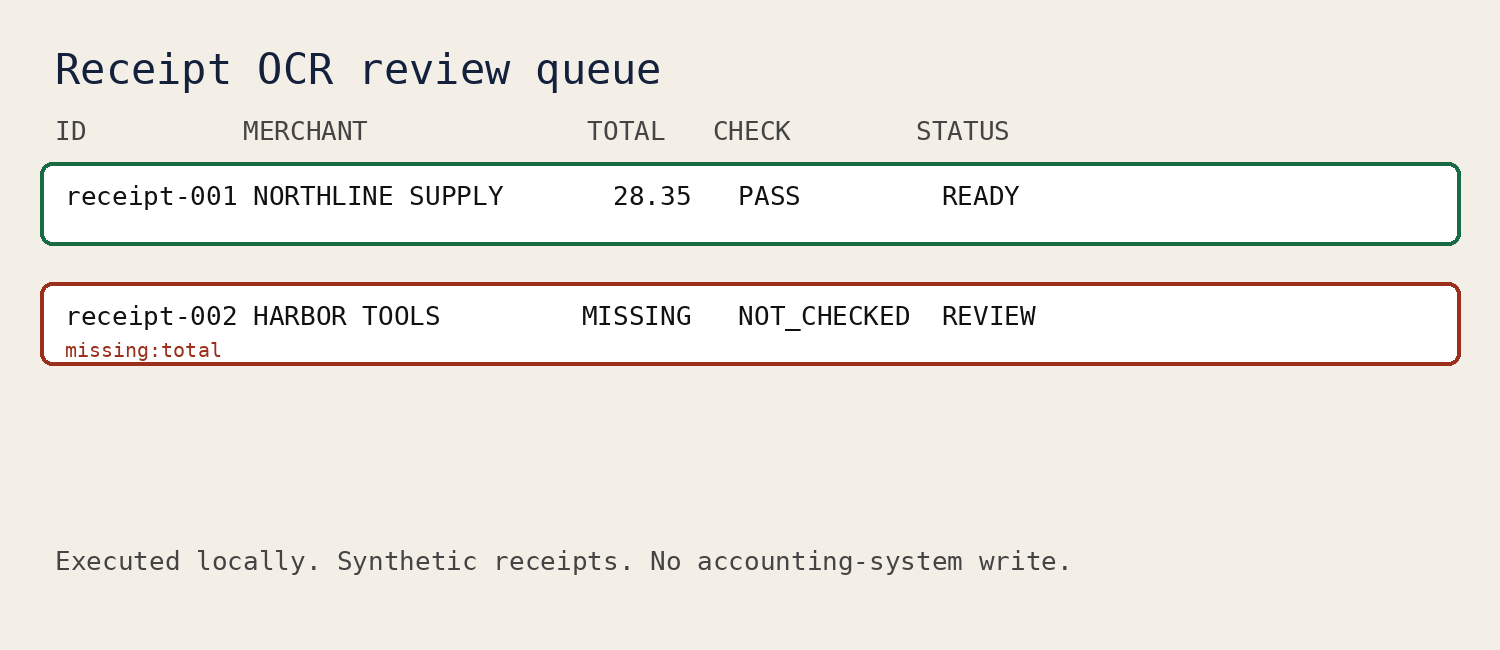
REVIEW receipt-002 reason=missing:total
EXPORT review_queue.csv rows=2 review-result.png
CHECK HOLD: review rows must be repaired before export
The command returned status 0 and stderr was empty. Status 0 means the scan completed, not that every row is approved. The final CHECK HOLD line is the business state.
Open work/review-result.png, then compare each row with the corresponding receipt image. The green row has all required fields and passing arithmetic. The red row has no parsed total, so arithmetic was not attempted. The complete review queue preserves both outcomes.
4. Apply the correction and recheck arithmetic
Run:
python3 receipt_review.py approve work inputs/corrections.csv
Complete observed stdout was:
CORRECTIONS applied=1
CHECK arithmetic_pass=2/2 missing_fields=0
EXPORT approved_receipts.csv rows=2 total=110.97
CHECK PASS: every row is approved; accounting import remains manual
The command returned status 0 with empty stderr. The arithmetic is exact decimal arithmetic: 26.25 + 2.10 = 28.35 and 76.50 + 6.12 = 82.62. The approved totals sum to 110.97.
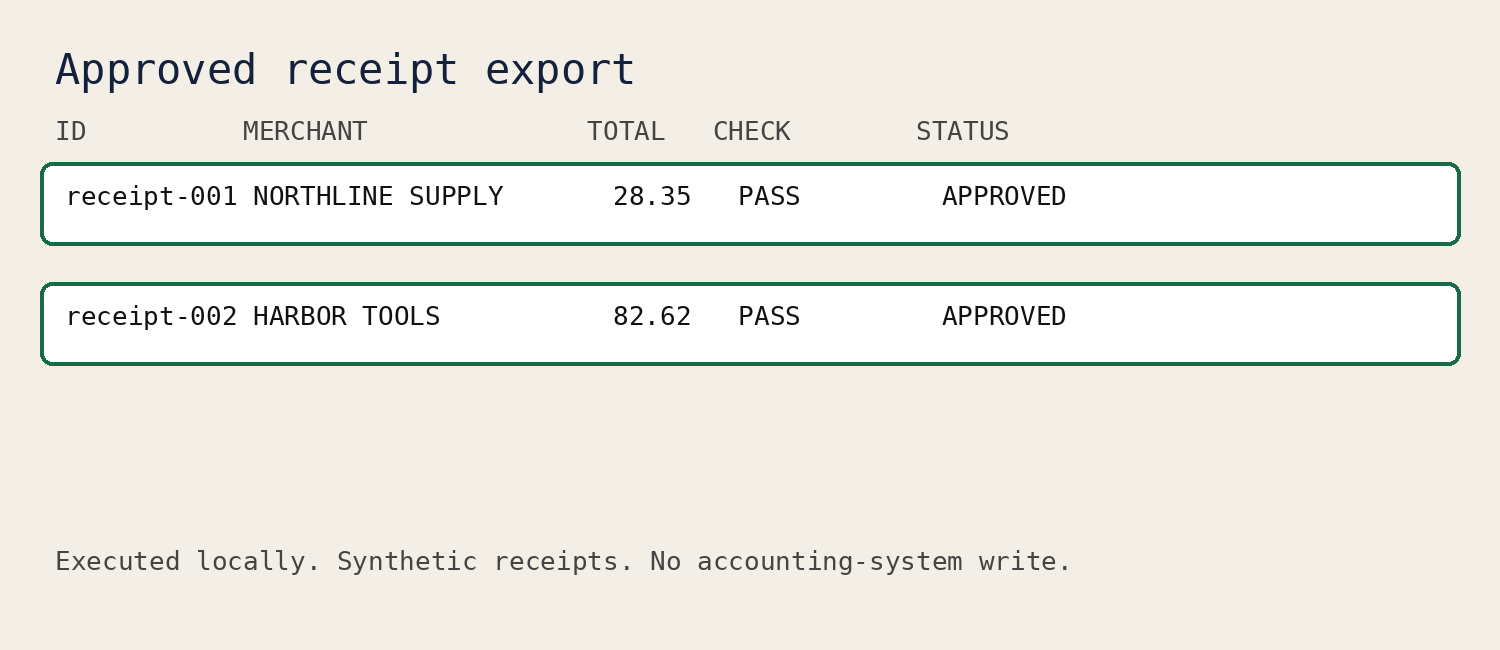
Approval here is procedural. The program confirms that required fields exist, arithmetic passes and a correction record names a reviewer. It does not confirm business purpose, category, currency, duplicate status, receipt authenticity or tax treatment.
The integration boundary is deliberately manual
approved_receipts.csv is the only handoff. Copy reviewed rows into your accounting product's documented import template or enter them manually. Map receipt_id to a stable attachment name, not to a bank transaction unless a person has reconciled it. Retain the source hash so you can verify which image produced the row.
Do not connect this script directly to QuickBooks, Xero, a bank feed or a tax submission. Those systems have their own schemas, authentication, duplicate handling and audit requirements. This lesson did not request permissions or execute a live import.
The manual fallback is simple: stop OCR, read the original receipt, type the record into the normal bookkeeping route and attach the image. Record why OCR was bypassed. If a bad CSV has already been imported, use the accounting product's supported reversal or correction process and the pre-import export. Rerunning OCR is not a rollback.
Failure cases that deserve a queue
| Failure | Program behavior | Human decision |
|---|---|---|
| Total label missing or damaged | Leaves total blank and sets REVIEW |
Read the source image or enter the receipt manually. |
| Subtotal plus tax does not equal total | Sets arithmetic to FAIL |
Check discounts, tips, multiple tax lines and OCR mistakes. |
| Merchant or date is missing | Holds the row | Confirm the field from the original, or reject the image. |
| Correction points to an unknown field | Stops without an approved export | Repair the correction file instead of weakening validation. |
| Approved export already exists | Stops before overwrite | Keep the prior evidence and choose a new clean run. |
| Tesseract writes stderr or exits nonzero | Stops the scan | Check language data, image access and the installed binary. |
Poor photographs add more cases: rotation, glare, curved paper, faint thermal printing, multiple currencies and handwritten tips. This sample does not test them.
Troubleshooting by symptom
If every field is missing, open the saved per-receipt text file in work. Confirm that Tesseract recognized words before changing the parser. If lines are merged, try a documented page-segmentation mode on a copied test set and compare the same receipts. Do not change production behavior from one example.
If totals include currency symbols or comma separators, extend the money pattern and add fixtures for each accepted format. Keep Decimal; binary floating point is unnecessary for two-decimal bookkeeping checks.
If the parser accepts the wrong number, make the field rule narrower and add that receipt shape to a labelled evaluation set. A broad regular expression can increase apparent extraction rate while increasing silent errors.
If Pillow cannot find the sample font, update FONT_PATH for the demo generator. That path affects only the synthetic images. It is not required to scan existing receipts.
Check the finished files
You are finished when all three stdout blocks match the blocks above byte for byte, including the final newline, all three stderr files are empty, the review queue contains one READY row and one REVIEW row, and the approved CSV contains two APPROVED rows. Confirm its total is 110.97 and both source hashes match the input images.
The next learning step is a representative evaluation set. Include ordinary receipts, poor images, refunds, tips, discounts, several tax lines and duplicates. Measure field-level errors, held rows, reviewer time, repair time and rejected images. Compare that total effort with manual entry before deciding whether the workflow earns a place in operations.
Sources and what was tested
Tesseract's command-line documentation explains the OCR options used here. Its release notes identify the installed version. The Label Studio receipt example and PyImageSearch scanning tutorial cover broader annotation and image-preparation routes.
The recorded execution on November 15, 2026 used Tesseract 5.5.0, Python 3.12.14 and Pillow 13.0.0 in an isolated directory. Complete stdout matched the displayed blocks and stderr was empty. AI assisted the writing, code and synthetic inputs. No independent human trial, customer receipt, accounting import or savings study was performed. The exact two-receipt run supports the mechanics shown here; testing a representative batch is still necessary before using it for bookkeeping.
Optional technical appendix: complete tested script
#!/usr/bin/env python3
"""Local receipt OCR demo with an explicit review and repair boundary."""

from __future__ import annotations

import csv
import hashlib
import re
import subprocess
import sys
from decimal import Decimal, InvalidOperation
from pathlib import Path

from PIL import Image, ImageDraw, ImageFont


FONT_PATH = "/usr/share/fonts/truetype/dejavu/DejaVuSansMono.ttf"
FIELDS = [
    "receipt_id",
    "merchant",
    "date",
    "subtotal",
    "tax",
    "total",
    "arithmetic_status",
    "review_status",
    "review_reason",
    "source_sha256",
]


def write_csv(path: Path, rows: list[dict[str, str]], fields: list[str]) -> None:
    with path.open("w", newline="", encoding="utf-8") as handle:
        writer = csv.DictWriter(handle, fieldnames=fields, lineterminator="\n")
        writer.writeheader()
        writer.writerows(rows)


def money(value: str) -> Decimal | None:
    try:
        return Decimal(value) if value else None
    except InvalidOperation:
        return None


def arithmetic_status(row: dict[str, str]) -> str:
    subtotal, tax, total = (money(row[key]) for key in ("subtotal", "tax", "total"))
    if None in (subtotal, tax, total):
        return "NOT_CHECKED"
    return "PASS" if subtotal + tax == total else "FAIL"


def make_receipt(path: Path, merchant: str, date: str, subtotal: str, tax: str,
                 total_label: str, total: str, note: str) -> None:
    image = Image.new("RGB", (900, 1120), "#f7f2e8")
    draw = ImageDraw.Draw(image)
    font = ImageFont.truetype(FONT_PATH, 40)
    bold = ImageFont.truetype(FONT_PATH, 48)
    draw.rectangle((45, 35, 855, 1085), fill="white", outline="#c8c0b4", width=3)
    y = 90
    draw.text((100, y), merchant, font=bold, fill="black")
    y += 100
    for line in [
        f"DATE      {date}",
        "ITEM      OFFICE SUPPLIES",
        "QTY       1",
        "",
        f"SUBTOTAL  {subtotal}",
        f"TAX       {tax}",
        f"{total_label:<9} {total}",
    ]:
        draw.text((100, y), line, font=font, fill="black")
        y += 76
    draw.line((90, y + 10, 810, y + 10), fill="#777", width=2)
    draw.text((100, y + 55), note, font=ImageFont.truetype(FONT_PATH, 25), fill="#555")
    image.save(path, dpi=(300, 300))


def make_samples(input_dir: Path) -> None:
    if input_dir.exists() and any(input_dir.iterdir()):
        raise SystemExit("STOP input directory must be new or empty")
    input_dir.mkdir(parents=True, exist_ok=True)
    make_receipt(
        input_dir / "receipt-001.png", "NORTHLINE SUPPLY", "2026-11-12",
        "26.25", "2.10", "TOTAL", "28.35", "SYNTHETIC TRAINING RECEIPT",
    )
    make_receipt(
        input_dir / "receipt-002.png", "HARBOR TOOLS", "2026-11-13",
        "76.50", "6.12", "AM0UNT", "82.62", "SYNTHETIC DAMAGED TOTAL LABEL",
    )
    correction_fields = ["receipt_id", "field", "corrected_value", "reason", "reviewer"]
    write_csv(
        input_dir / "corrections.csv",
        [{
            "receipt_id": "receipt-002",
            "field": "total",
            "corrected_value": "82.62",
            "reason": "Read visible amount beside damaged total label",
            "reviewer": "sample-reviewer",
        }],
        correction_fields,
    )
    print("SAMPLES receipts=2 synthetic=true damaged_labels=1")
    print("FILES receipt-001.png receipt-002.png corrections.csv")


def ocr_lines(image_path: Path) -> tuple[list[str], list[float]]:
    command = [
        "tesseract", str(image_path), "stdout", "-l", "eng", "--psm", "6",
        "--dpi", "300", "tsv",
    ]
    result = subprocess.run(command, capture_output=True, text=True, check=False)
    if result.returncode != 0 or result.stderr:
        raise RuntimeError(f"tesseract failed for {image_path.name}: {result.stderr.strip()}")
    rows = list(csv.DictReader(result.stdout.splitlines(), delimiter="\t"))
    groups: dict[tuple[str, str, str, str], list[str]] = {}
    confidences: list[float] = []
    for row in rows:
        text = row.get("text", "").strip()
        if not text:
            continue
        key = (row["page_num"], row["block_num"], row["par_num"], row["line_num"])
        groups.setdefault(key, []).append(text)
        confidence = float(row["conf"])
        if confidence >= 0:
            confidences.append(confidence)
    return [" ".join(words) for words in groups.values()], confidences


def first_match(pattern: str, lines: list[str]) -> str:
    for line in lines:
        match = re.search(pattern, line, flags=re.IGNORECASE)
        if match:
            return match.group(1)
    return ""


def parse_receipt(image_path: Path, work_dir: Path) -> dict[str, str]:
    lines, confidences = ocr_lines(image_path)
    (work_dir / f"{image_path.stem}.txt").write_text("\n".join(lines) + "\n", encoding="utf-8")
    merchant = lines[0].strip() if lines else ""
    row = {
        "receipt_id": image_path.stem,
        "merchant": merchant,
        "date": first_match(r"DATE\s+(\d{4}-\d{2}-\d{2})", lines),
        "subtotal": first_match(r"SUBTOTAL\s+([0-9]+\.[0-9]{2})", lines),
        "tax": first_match(r"^TAX\s+([0-9]+\.[0-9]{2})", lines),
        "total": first_match(r"^TOTAL\s+([0-9]+\.[0-9]{2})", lines),
        "arithmetic_status": "",
        "review_status": "",
        "review_reason": "",
        "source_sha256": hashlib.sha256(image_path.read_bytes()).hexdigest(),
    }
    row["arithmetic_status"] = arithmetic_status(row)
    missing = [key for key in ("merchant", "date", "subtotal", "tax", "total") if not row[key]]
    if missing:
        row["review_status"] = "REVIEW"
        row["review_reason"] = "missing:" + ",".join(missing)
    elif row["arithmetic_status"] != "PASS":
        row["review_status"] = "REVIEW"
        row["review_reason"] = "arithmetic:" + row["arithmetic_status"].lower()
    else:
        row["review_status"] = "READY"
        row["review_reason"] = ""
    return row


def render_result(path: Path, rows: list[dict[str, str]], title: str) -> None:
    image = Image.new("RGB", (1500, 650), "#f3efe6")
    draw = ImageDraw.Draw(image)
    title_font = ImageFont.truetype(FONT_PATH, 42)
    body_font = ImageFont.truetype(FONT_PATH, 26)
    draw.text((55, 45), title, font=title_font, fill="#14213d")
    draw.text((55, 115), "ID          MERCHANT              TOTAL   CHECK        STATUS", font=body_font, fill="#444")
    y = 180
    for row in rows:
        color = "#9c2f1b" if row["review_status"] == "REVIEW" else "#176b45"
        text = f"{row['receipt_id']:<11} {row['merchant'][:20]:<20} {row['total'] or 'MISSING':>7}   {row['arithmetic_status']:<12} {row['review_status']}"
        draw.rounded_rectangle((40, y - 18, 1460, y + 65), radius=12, fill="white", outline=color, width=4)
        draw.text((65, y), text, font=body_font, fill="#111")
        if row["review_reason"]:
            draw.text((65, y + 38), row["review_reason"], font=ImageFont.truetype(FONT_PATH, 20), fill=color)
        y += 120
    draw.text((55, 545), "Executed locally. Synthetic receipts. No accounting-system write.", font=body_font, fill="#444")
    image.save(path)


def scan(input_dir: Path, work_dir: Path) -> None:
    if work_dir.exists():
        raise SystemExit("STOP work directory already exists")
    work_dir.mkdir(parents=True)
    images = sorted(input_dir.glob("receipt-*.png"))
    if not images:
        raise SystemExit("STOP no receipt-*.png files found")
    rows = [parse_receipt(path, work_dir) for path in images]
    write_csv(work_dir / "review_queue.csv", rows, FIELDS)
    render_result(work_dir / "review-result.png", rows, "Receipt OCR review queue")
    ready = sum(row["review_status"] == "READY" for row in rows)
    review = len(rows) - ready
    print("OCR tesseract=5.5.0 language=eng psm=6")
    print(f"INPUT receipts={len(rows)} synthetic=true")
    print(f"RESULT ready={ready} review={review}")
    for row in rows:
        if row["review_status"] == "REVIEW":
            print(f"REVIEW {row['receipt_id']} reason={row['review_reason']}")
    print(f"EXPORT review_queue.csv rows={len(rows)} review-result.png")
    print("CHECK HOLD: review rows must be repaired before export")


def approve(work_dir: Path, corrections_path: Path) -> None:
    queue_path = work_dir / "review_queue.csv"
    output_path = work_dir / "approved_receipts.csv"
    if output_path.exists():
        raise SystemExit("STOP approved export already exists")
    with queue_path.open(newline="", encoding="utf-8") as handle:
        rows = list(csv.DictReader(handle))
    with corrections_path.open(newline="", encoding="utf-8") as handle:
        corrections = list(csv.DictReader(handle))
    by_id = {row["receipt_id"]: row for row in rows}
    for correction in corrections:
        receipt_id = correction["receipt_id"]
        field = correction["field"]
        if receipt_id not in by_id or field not in ("merchant", "date", "subtotal", "tax", "total"):
            raise SystemExit("STOP correction references unknown receipt or field")
        if not correction["reason"].strip() or not correction["reviewer"].strip():
            raise SystemExit("STOP every correction needs a reason and reviewer")
        by_id[receipt_id][field] = correction["corrected_value"].strip()
    for row in rows:
        row["arithmetic_status"] = arithmetic_status(row)
        missing = [key for key in ("merchant", "date", "subtotal", "tax", "total") if not row[key]]
        if missing or row["arithmetic_status"] != "PASS":
            raise SystemExit(f"STOP {row['receipt_id']} still fails review")
        row["review_status"] = "APPROVED"
        row["review_reason"] = ""
    write_csv(output_path, rows, FIELDS)
    render_result(work_dir / "approved-result.png", rows, "Approved receipt export")
    total = sum(Decimal(row["total"]) for row in rows)
    print(f"CORRECTIONS applied={len(corrections)}")
    print(f"CHECK arithmetic_pass={len(rows)}/{len(rows)} missing_fields=0")
    print(f"EXPORT approved_receipts.csv rows={len(rows)} total={total:.2f}")
    print("CHECK PASS: every row is approved; accounting import remains manual")


def main() -> None:
    if len(sys.argv) < 3:
        raise SystemExit("USAGE make-samples INPUT_DIR | scan INPUT_DIR WORK_DIR | approve WORK_DIR CORRECTIONS.csv")
    command = sys.argv[1]
    if command == "make-samples" and len(sys.argv) == 3:
        make_samples(Path(sys.argv[2]))
    elif command == "scan" and len(sys.argv) == 4:
        scan(Path(sys.argv[2]), Path(sys.argv[3]))
    elif command == "approve" and len(sys.argv) == 4:
        approve(Path(sys.argv[2]), Path(sys.argv[3]))
    else:
        raise SystemExit("USAGE make-samples INPUT_DIR | scan INPUT_DIR WORK_DIR | approve WORK_DIR CORRECTIONS.csv")


if __name__ == "__main__":
    main()