 publish
The sales sheet is already open. It has five regions, quarterly figures, a total and a chart. An assistant asked to highlight declining regions should be able to work in that sheet, leaving the person with formulas and editable cells.
That is the appealing idea behind Chrome Labs' WebMCP spreadsheet demo. Its ordinary toolbar and its agent-facing tools lead into the same workbook. A person can type into cells; a compatible agent can submit values, formulas, formatting and chart operations through named functions.
The implementation makes an unusually concrete promise: an agent's edit belongs in the same undo history as a person's edit. The assistant is another participant in the application, rather than a separate report generator.
There is an important qualification to the observation here. On November 23, the live page loaded its sample workbook and displayed “27 WebMCP tools ready.” This browser's tool-discovery interface nevertheless returned no available WebMCP tools. The screenshot below shows the human interface after loading sample data. It does not show an agent completing the task.
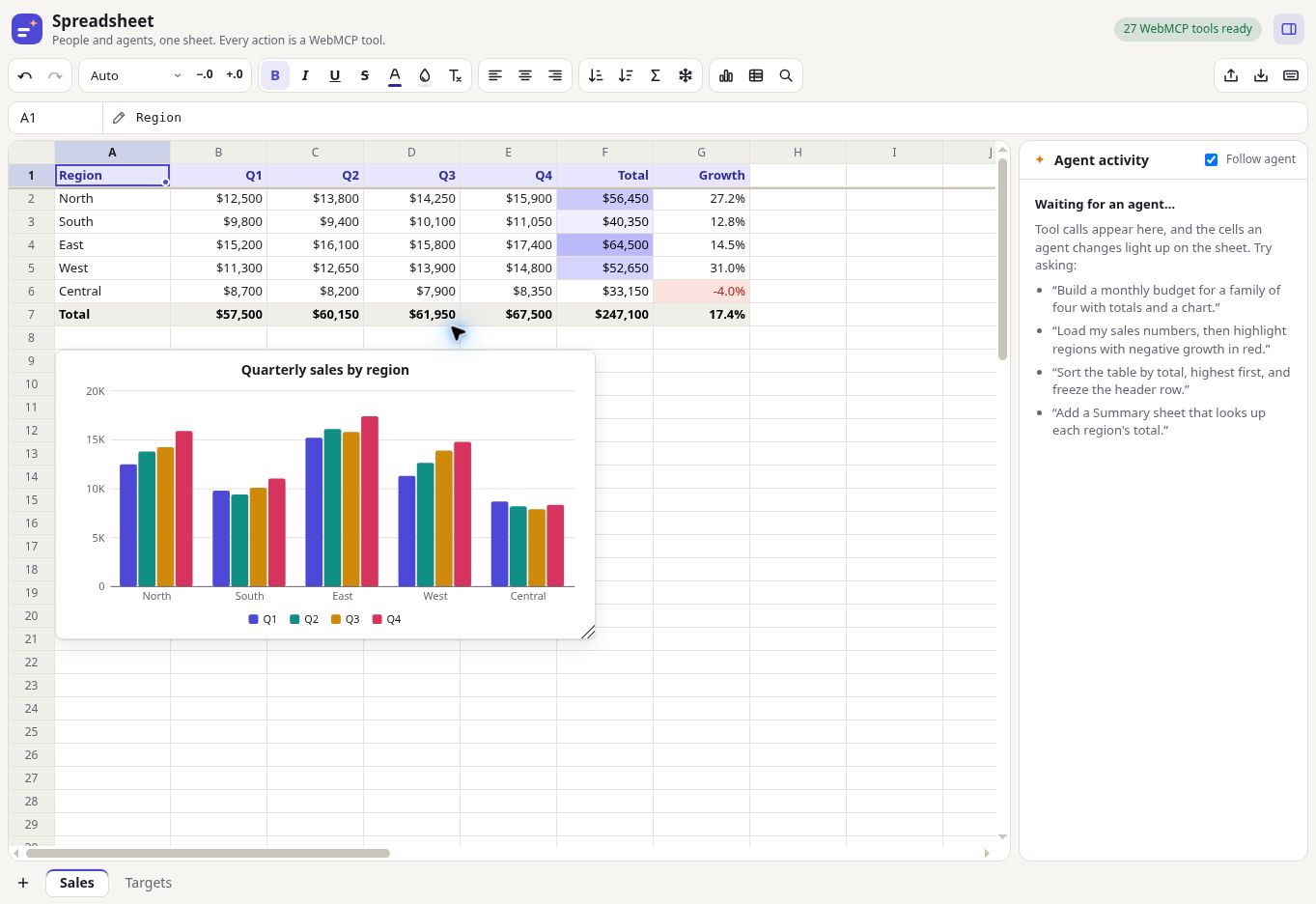
Actual browser capture, November 23. The sample is supplied by the demo, not a company's accounts. Loading it through the page produced a displayed total of $247,100 and Central-region growth of -4.0%. “Waiting for an agent” remains visible. Source: GoogleChromeLabs/webmcp-tools.
Give the assistant the operation the user meant
WebMCP is an experimental browser API through which a page registers functions that an agent can discover and call. The developer describes each function and the arguments it accepts. A spreadsheet can expose “sort these rows by this column” directly, alongside its existing mouse and keyboard controls.
That changes where part of the work happens. An assistant driving the interface has to find the range, select the appropriate menu and interpret what changed. A page-defined tool can express that operation in the application's own vocabulary.
The spreadsheet's tool catalog includes reading a range, writing values, sorting rows, adding a chart and inspecting the person's current selection. The last capability matters more than its modest name suggests. When someone asks about “these cells,” the application already knows which cells they selected.
The example is a useful model for application builders because it preserves the thing people came to use. The spreadsheet stays a spreadsheet. Its formulas, selection, visible chart and editing history remain the shared working context.
For a fixed report, an ordinary formula or script may already be sufficient. An agent becomes interesting when the request varies: compare different regions, change the chart, explain a selection, then revise part of the workbook. WebMCP supplies a possible connection to those operations. It does not supply the judgment that chooses them.
One workbook, two ways to change it
The most revealing source file is the tool wrapper. Before executing an operation, it checks the supplied arguments. It then runs the operation inside a workbook transaction, labels its source as an agent action and records an activity entry.
The transaction is the unit of change. That gives the application a way to collect a multi-cell edit into one undo step. The activity entry can tell the person what was attempted and which cells it affected.
This is a stronger design than having a model describe what it supposedly changed. The application's own workbook code produces the state change and the result. The model still has to choose the correct range and interpret the outcome, but it is not inventing a parallel version of the sheet in its reply.
The cell-writing tool also accepts the kind of text a person would type. Currency, percentages, dates and formulas are interpreted by the spreadsheet engine.
One source test writes a row containing a price of $1,200 and a share of 12.5%. The resulting values are 1200 and 0.125. A total formula returns 1200; a deliberate division by zero returns a formula error. Undo then removes that edit from the workbook.
Those are bounded software observations. The project's 32 component tests passed when executed in a clean Node.js 24.22.3 process for this article. They exercise the formula engine, workbook and tool wrappers without a browser agent. They do not measure a model's ability to construct a correct financial workbook.
The application still has to understand bad requests
A tool description tells the assistant what an operation expects. It cannot guarantee that the assistant will provide it.
The demo therefore checks arguments in its own schema validator. Unknown parameters, missing required values and invalid choices produce errors before the operation runs. The tests include a request to clear a range while supplying an irrelevant color parameter, and a request to write values without supplying the values.
Another test deliberately writes beyond the sheet's available rows. The call fails, the sheet remains empty and no undo action is created. An unexpected internal failure also has a rollback test.
These details matter to someone using the sheet. An assistant should receive a specific explanation it can correct, while the person should retain a comprehensible document. A partial edit followed by a fluent apology would leave both with a harder problem.
The implementation does not make every action harmless. Deleting rows, overwriting formulas and changing a chart can still be the wrong response to a request. Its transaction and error handling provide application behavior to build on, not a general authorization system.
Why the page's badge was not enough
The discovery gap in this browser is worth placing beside the capability, rather than hiding it in a footnote. The page's registration status and an agent's usable tool list are different observations. This run established the former display and the absence of tools in the latter interface; it did not establish the cause.
A November 18 issue report describes a similar distinction in a different environment: the reporter could register page tools in Chrome but could not get Gemini in Chrome to consume them. That report includes additional behavioral claims that were not reproduced here. It is evidence of a specific reported integration problem, not a verdict on every Chrome or Gemini configuration.
The demo's shared requirements currently name Chrome 155 or later and a WebMCP-capable agent. They also describe additional setup for local or other Chromium-based environments. A working page alone is not a complete agent integration.
There is a second complication once a connection works. The person may select another sheet or navigate while the assistant is thinking. A September 17 standards discussion asks how agents should stay aware of context changed by people, navigation or time. An instruction such as “sort this” becomes ambiguous if the agent is acting on yesterday's selection.
Playwright provides one documented bridge. Its MCP documentation describes offering tools from the current tab as names prefixed with webmcp_. That is a documented integration route, not the browser path executed in this inspection. Page-provided descriptions and results remain untrusted input.
The useful change is where the work lands
The spreadsheet demo is educational software with no backend or persistence, according to its README. It is not a replacement for a team's saved business workbook, and the sample figures prove nothing about business accuracy or time saved.
Its useful contribution is architectural. A website can give an assistant access to meaningful operations while keeping the work visible and editable in the application people already understand. Shared selection, computed values, activity and undo are parts of that relationship.
For an application builder, the design question becomes specific: which operation would spare an assistant from guessing at interface mechanics, and what visible state should it return? For the person using it, the equally important question is whether their chosen browser-agent combination can actually discover and invoke that operation.
A compelling integration needs both answers. The source makes the shared-workbook design inspectable. The next demonstration needs an agent acting through the browser bridge, with the resulting cells and undo history visible to the person beside it.
Production disclosure: This AI-assisted report combines source inspection, an actual browser capture and 32 passing component tests. No WebMCP tool was invoked through the browser, no autonomous spreadsheet task completed, and no production integration, model benchmark or savings measurement is claimed.